Yesterday, Microsoft was having a bad day. Outlook was down for most of the day. You can search the web for more information on what happened, but what I want to talk about is how this affected our company website.
I have been working for SkyChefs in IT for the past 27 years and today my title is Sr. Cloud Infrastructure Engineer. This means that I am responsible for our cloud environment and to make sure that everything is up and running. We run our services in AWS and have been for the past 2 years. I had scheduled vacation days for yesterday and today to spend time with my family, so I tried to not log in to see what was going on but my phone started pinging around 12:00 PM CDT and I couldn't ignore it.
Messages were coming through Microsoft Teams that users were having issues with Outlook so I fired up my laptop to check it out. At the same time, I received a message that something was going on with our main company website. It was unreachable. I thought that this was strange and decided to take a look as this is something I could fix versus what was going with Outlook. I logged into our AWS console and saw that our Elastic Container Services (ECS) for our main website was getting a huge amount of traffic. (ECS runs the application for our website.) This caused the health check for our website to be unable to return "I'm OK" messages. When this happens, AWS will create a new server to fail over to, but with every new server that was being created, the application could not return an "I'm OK" because of all the traffic being sent. So the next thing I needed to look at was what was actually being sent. Looking at our log files, I could see that the URL requests to our application were for "/autodiscover/autodiscover.xml". We were getting hundreds of request per minute.
A quick explanation about autodiscover and what it is for. In Outlook, when you log in, the application will do a quick check to see how to access your mail. There are certain URLs that are checked to try and automatically determine your setup based on your email domain. We have a rule for our email that sends this traffic to Microsoft as we use their cloud services. So the first request for this is sent to "https://autodiscover.example.com/autodiscover/autodiscover.xml". I guess since Microsoft could not handle this request because of their outage, the fallback was to check "https://example.com/autodiscover/autodiscover.xml". Because every user attempting to reach their email encountered failure with the Microsoft autodiscover URL, Outlook began sending requests to our main website. Because the above URL does not exist on our website, we have a generic rule to redirect the traffic to our home page "https://example.com". There were hundreds of requests being sent per minute that brought down our website.
At this point, I needed a way to prevent these requests from flowing through to our main website so that our application could recover. Between our application and the internet, we have a couple of load balancers that handle internet traffic. We also have security checks that happen on all requests to look for malicious behavior, bots, and other things to prevent bad actors from exploiting our applications. One tool that we use is AWS Web Application Firewall (WAF). This service allows us to setup custom rules to look at URL's being sent and then accept, block, or log them. I quickly created a new rule for the autodiscover URL and forced a 404 (URL Not Found) response. That way, the WAF is responding to the traffic instead of accepting it and forwarding it to our application. I pushed the change to our WAF, and after a few minutes, could see it responding to the requests. This allowed our application to recover and our website to come back online. Below are a couple of graphs showing the last 24 hours of traffic to our website.
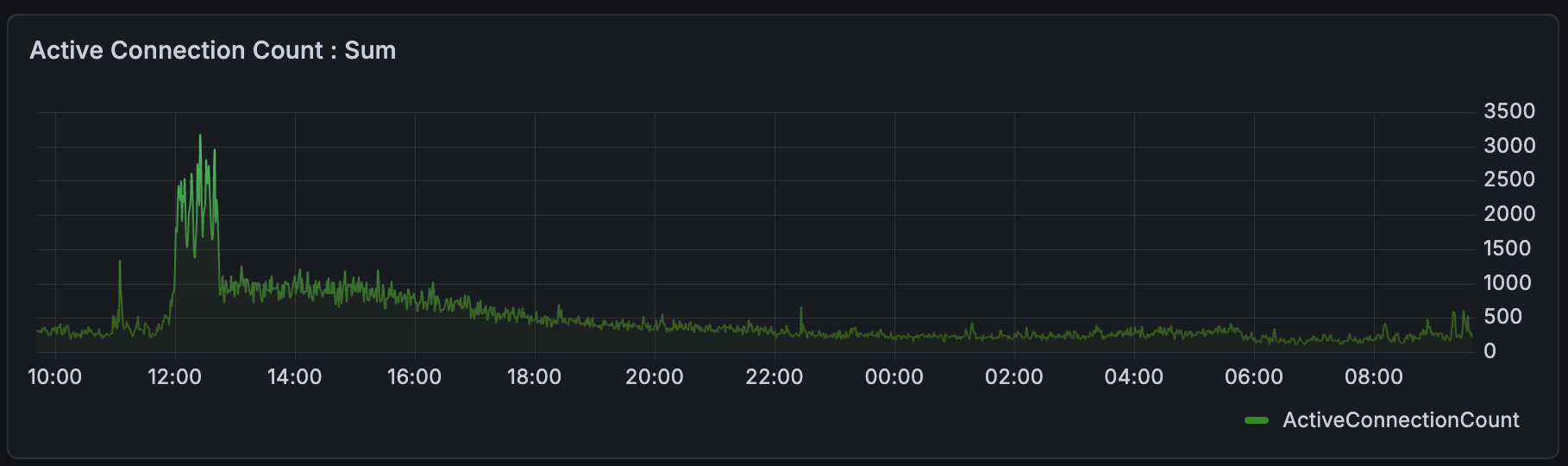
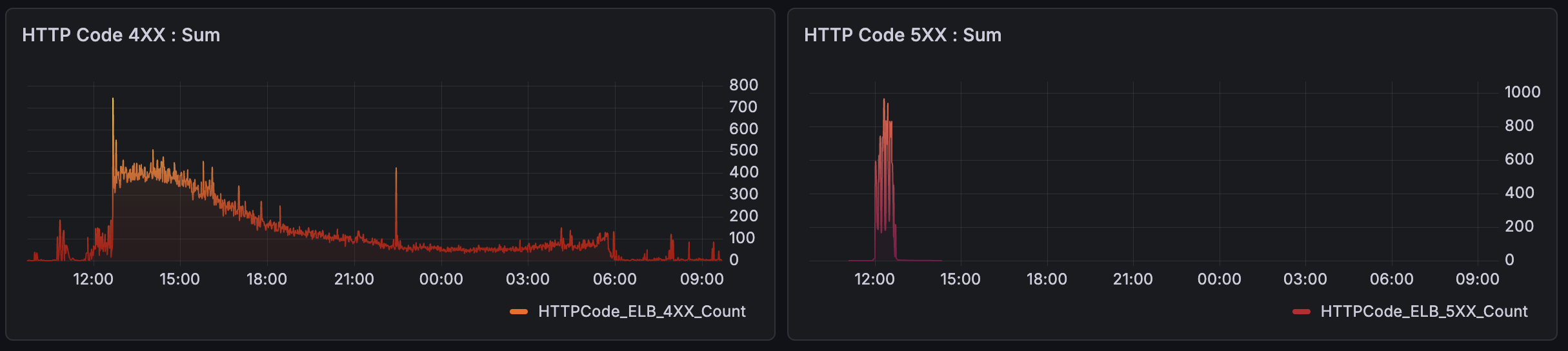
From the above graph, you can see that we started receiving the autodiscover requests around 12:00 PM CDT. The green graph of "Active Connections" shows the spike in requests and the red graph of "HTTP Code 5XX" show corresponding errors that our website is down. Then around 12:40 PM CDT, you can see in the orange "HTTP Code 4XX" graph where I finally setup our WAF rule to handle the flood of traffic, and the subsequent reduction of errors in the red "HTTP Code 5XX" graph.
This WAF rule is a temporary fix to allow our main website to function. I will need to do some more research to see if this should be a permanent solution or if we have other options to prevent this should it happen again. But that is for future Ben to figure out.
All in all, it wasn't a complex fix for us and the time from reporting the website being down to being back up was about 20 minutes. I would have preferred that time to have been shorter, but I'm on vacation and it took me a minute to get in front of my computer. 😄
Definitely an easier fix than what Microsoft went though and not something I would have thought we would have been affected by either. I have a current ongoing project to start using a CDN in front of our websites. Maybe this would have allowed our website to continue to work for a bit while I was working on a temporary solution.